Mount-It! Standing Desk Converter: Heavy Base, Two-Hand Lift
We bought the Mount-It! Standing Desk Converter for an employee. Solid wood surfaces, metal frame, dual monitor mounts, and a base heavy enough to feel safe.
The Mount-It! Standing Desk Converter is worth buying if you want a desk riser that feels planted once it’s up. The base is heavy, the surfaces are wood, the frame underneath is metal, and it comes with two monitor mounts. Skip it if you need a one-handed lift.
As an Amazon Associate I earn from qualifying purchases.
How this review was made: written from my own video review of this product. Every opinion here is my own, from using it myself.
Quick Verdict
The weight that makes it awkward to reposition is the same weight that keeps two 32-inch monitors dead-still at full height. Half an hour of assembly, zero ambiguous steps, and it’s been on the desk every day since.
Buy if you:
- run two monitors and want them on mounts, not sitting on the platform
- want wood surfaces instead of the usual painted MDF riser
- need the keyboard to rise with the top, on its own lower tier
- want to park papers, pens and a stapler on the upper deck while you type
Skip if you:
- want a one-handed lift, because it usually takes about two hands to raise
- need to move the thing around, since the base is the heaviest part by far
- don’t have 30 minutes free for assembly out of the box
Clicking takes you to Amazon. As an Amazon Associate we earn from qualifying purchases — pricing and availability subject to change.
| Height range | Raises 5.7″ to 17.1″ |
|---|---|
| Top platform | 23.6″ x 15.7″ |
| Keyboard tray | 26.7″ x 11.8″, with gel wrist pad |
| Monitor support | Two screens up to 32″ and 22 lbs each |
| VESA | 75×75, 100×100 |
| Lift | Gas spring, handle mounts left or right |
We Bought It for an Employee, Not for a Video
Hey guys, this started as an office purchase. One of our employees needed to get off their chair more, so we picked up the Mount-It! Standing Desk Converter and I filmed it on the way in. If you look under the top, you have the handle to lift up. You can put this on the left side or you can put it on the right side, which matters more than it sounds if someone’s desk is pushed into a corner.
The base is all wood, the keyboard tray is all wood, the top is all wood. That’s not what most risers in this price band are. And then it comes with the mounting arms for the monitor, so you get two screen mounts in the box rather than buying them after.
Heavy Isn’t a Flaw Here
People read “heavy” on a standing desk converter listing and assume it’s a knock. It’s the opposite. The base is the heaviest single piece, and once the whole thing is assembled it takes a real effort to slide across a desk, which is exactly the point. That weight is what keeps two 32-inch monitors from swaying when you type. Most aluminum risers wobble under that load; this one doesn’t move.
To be clear about limits: if you put all your weight on it, of course it’s going to topple over. That’s true of every riser ever made. Under normal use it definitely won’t fall over. The light aluminum risers I’ve seen wobble when you type hard. This one doesn’t, and the weight is the reason.
All Metal Underneath
Flip it and look at the frame: this is all metal, all nice and sturdy. That’s the part that decides whether a riser is still smooth in year three or sagging on one side. The gas spring handles the lift, and wherever you let go of the handle, that’s where it’s going to lock in. No preset notches to fight, no stopping one inch short of where you wanted.
Two monitors up to 32″ and 22 lbs each hang off the mount, which is a real load to keep steady across a 17.1″ rise. It doesn’t sway. The wood surfaces will show dings eventually the way wood does, but the structure carrying everything isn’t wood.
Check the current price on Amazon →The Two-Hand Lift
It usually takes about two hands to raise, and that’s the one thing I’d flag before you buy. I had to put the camera down to do it. If you’re the type who grabs a coffee in one hand and bumps the desk up with the other on the way past, that’s not this desk. Not a deal-breaker, just know it.
Assembly, Cables, and What Ownership Costs After
Putting this together did take about a half hour or so. The instructions were written well. Nothing was ambiguous and nothing had to be backed out and redone, which is where most 30-minute builds turn into 90-minute builds.
After that, it’s a dumb object, a compliment in this context. No motor, no power brick, no app, nothing to charge. Cable management is built in so the monitor cables don’t swing every time it goes up. Wipe the wood down like you would any desk. Nothing here wears out on a schedule and there’s nothing proprietary to replace.
What to Check Before You Order
Measure your existing desk first. The top platform is 23.6″ x 15.7″ and the keyboard tray is wider at 26.7″, so the tray overhangs the top deck when it’s down. That’s the two-tier design working for you: your monitors and your papers sit up top, your keyboard and mouse sit lower, and on the upper deck you can put some papers, pens, a stapler, whatever you need.
One thing on timing. Price on this one moves around a lot. It’s sitting near its normal level right now, but it has been considerably cheaper at points, so check the live price at the link rather than assuming today is the number. More than 50 people bought it in the past month, so it’s not some orphan listing nobody’s touching.
Pros
- Wood top, wood keyboard tray, wood base, with an all-metal frame underneath
- Heavy base means it feels safe fully raised, no wobble under normal use
- Two screen mounts included, VESA 75×75 and 100×100, up to 32″ screens
- Locks wherever you release the handle, anywhere across the 5.7″ to 17.1″ range
- Handle mounts on the left or right side
Cons
- Usually takes two hands to lift, so no casual one-handed adjustment
- The weight that makes it stable also makes it awkward to reposition
- About half an hour of assembly before you can use it
Frequently Asked Questions
Can I use it with a laptop instead of monitors?
Yes, a laptop sits on the 23.6″ x 15.7″ top platform without using the mounts at all. The arms are VESA, so a laptop won’t attach to them, but the deck is there either way. You’d just lose the main advantage of this particular standing desk converter.
Will my monitors fit the included mounts?
If they’re 32″ or smaller, under 22 lbs each, and have VESA 75×75 or 100×100 holes on the back, yes. Most mainstream monitors do. Ultrawides and some all-in-one style screens with no VESA pattern won’t.
Does it need to be plugged in?
No. The lift is a gas spring, so there’s no motor, no cord, and nothing to charge. If you specifically wanted a standing desk converter electric model with a motor button, this isn’t that one.
Can one person assemble it alone?
Yes, I did it solo in about half an hour and the instructions were written well. The one place a second person helps is lifting the base onto the desk, because that’s the heavy part. Clear your desk before you start.
Get it now
Mount-It! Standing Desk Converter
Get the best price on Amazon →Affiliate link. See the disclosure at the top of this post.
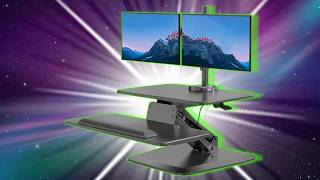
The dual monitor mounts alone would run you $40, $60 if you bought them separately, factor that in when you’re comparing prices. If the two-hand lift isn’t a dealbreaker, there’s not much competition at this weight class.
🛍️ Shop everything in this video
Every product mentioned, in one place. These are affiliate links, so I may earn a small commission at no extra cost to you.
🛍️ Solid Wood Standing Desk: check price on Amazon →
🛍️ Standing Desk Monitor Mount: check price on Amazon →